
How to export your user list
Goal
Download a list of your team's members as a CSV file.
You need a team workspace and admin rights for this. Click your initials at the bottom-left to see your workspaces — the one you're in has a check mark next to it. If that's your Personal Account, click the team workspace you want instead; Workspace Settings doesn't exist on a Personal Account. You also need to be the workspace Owner or an Admin.
Quick path
- Go to Workspace Settings → Members.
- Click More team actions (top-right).
- Choose Export Members (CSV).
Step-by-step
-
Open Members. Go to Workspace Settings → Members.
-
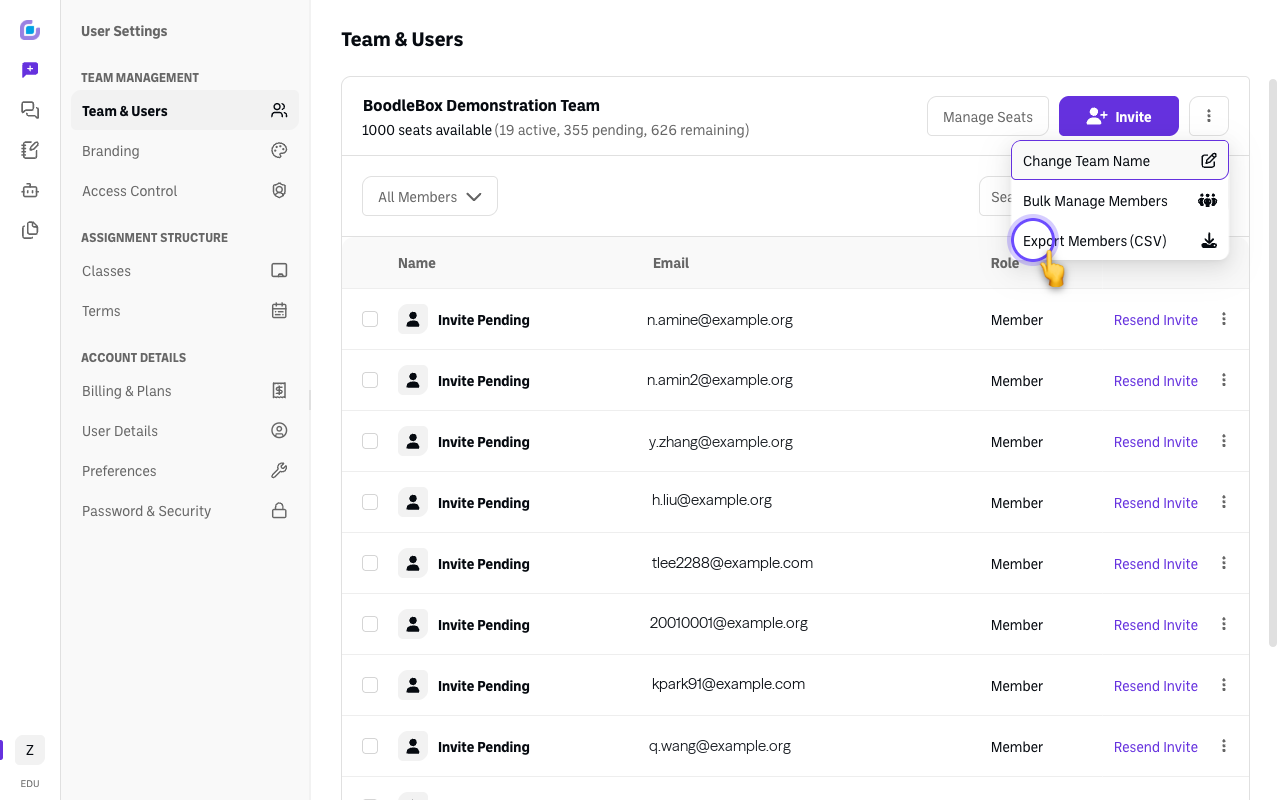
Open the actions menu. Click More team actions at the top-right.
-
Choose Export Members (CSV). Your member list downloads as a CSV — names, emails, and roles you can open in a spreadsheet.
Verify it's working
- A CSV file downloads and opens with your team's members.
Still stuck?
For deeper usage/engagement analytics (beyond the roster), see How to get your team's analytics and usage reports. Email success@boodle.ai — typical response within 8 business hours.