
How to change your email address
Goal
Update the email address on your BoodleBox account — most commonly to switch from a personal email to your organization or institution email, so your account connects to the proper workspace, SSO, and roster.
Before you start
- You'll need access to both accounts: your current BoodleBox login, and the inbox of the new email address (a verification code is sent there).
- Use the exact email you want to change to — the one in your school's roster or identity provider. An exact match is what links your account to your team and SSO; a variation or alias can leave you unprovisioned.
- If your institution uses SSO and you already ended up with two accounts (personal + school), don't change the email yourself — contact success@boodle.ai and we'll assist.
Steps
-
Log in to BoodleBox using your current (personal) email address and password.
-
Click your avatar (or initials) in the bottom-left corner to open the settings menu.
-
Click "Settings."
-
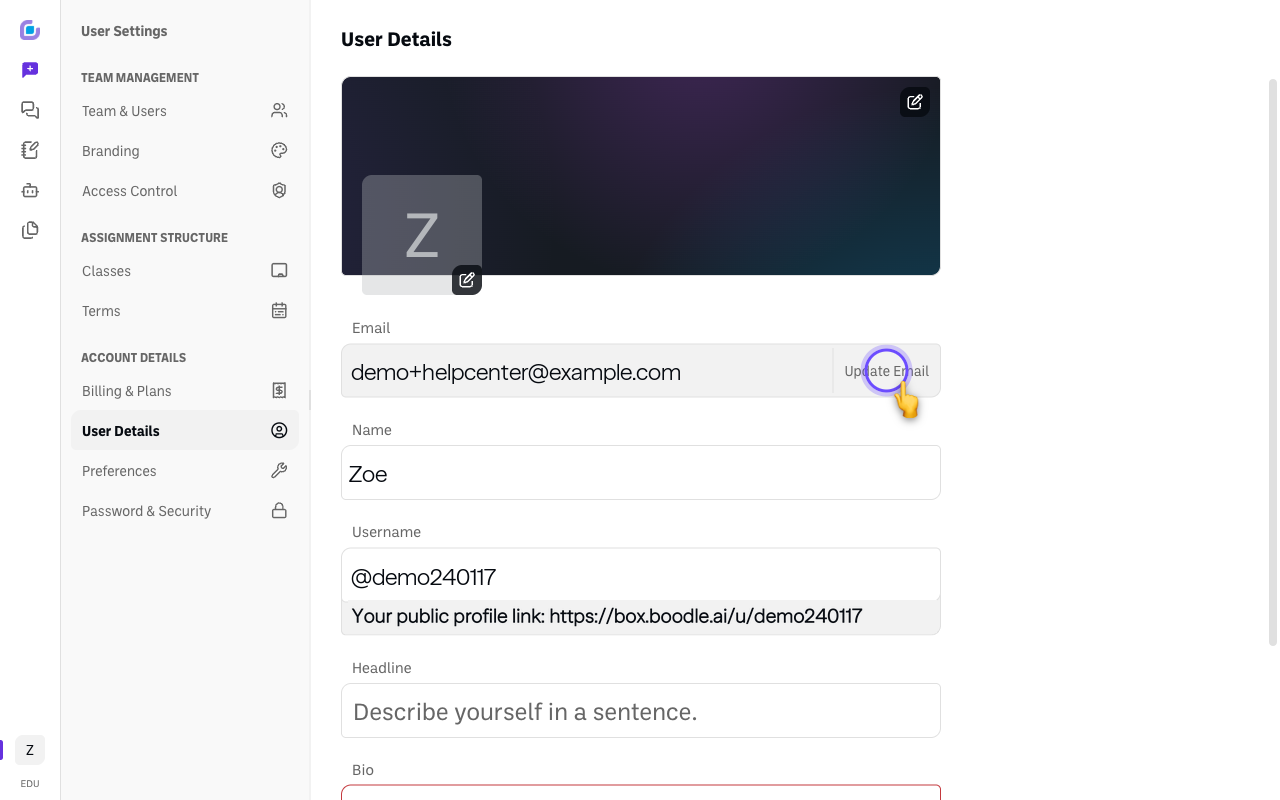
Find the field showing your current email address and click "Update Email" next to it.
-
Enter your new institutional email address in the field provided.
-
Click "Send verification code."
-
Check your institutional email inbox for a verification email from BoodleBox.
-
Open the verification email and follow the instructions (usually clicking a verification link) to confirm your new email address.
-
Done. Your BoodleBox account now uses your institutional email — use it to log in from now on. Your chats and work stay intact.
Common issues
- The verification email never arrives → check spam/junk, confirm you typed the address correctly, and try Send verification code again.
- You changed the email but still can't access your team → your institution's roster may list a different address, or the next sync hasn't run yet. Ask your BoodleBox admin to confirm the exact email on the roster.
- You signed in with SSO and a new, empty account appeared → the SSO email didn't match your existing account's email. Email success@boodle.ai and we'll assist.
Still stuck?
Email success@boodle.ai — typical response within 8 business hours.