
How to attach knowledge to a bot
Goal
Make a custom bot an expert on your files by adding them to its Knowledge.
Quick path
- Open the bot in Bot Builder → Configure.
- In the Knowledge section, add files (upload or pick from your Knowledge Bank).
- Publish Changes.
Step-by-step
-
Open the bot in Bot Builder and go to the Configure tab.
-
Find the Knowledge section. Drop files in directly, or add them from your Knowledge Bank. Files attached here are encrypted end-to-end and used only by this bot.
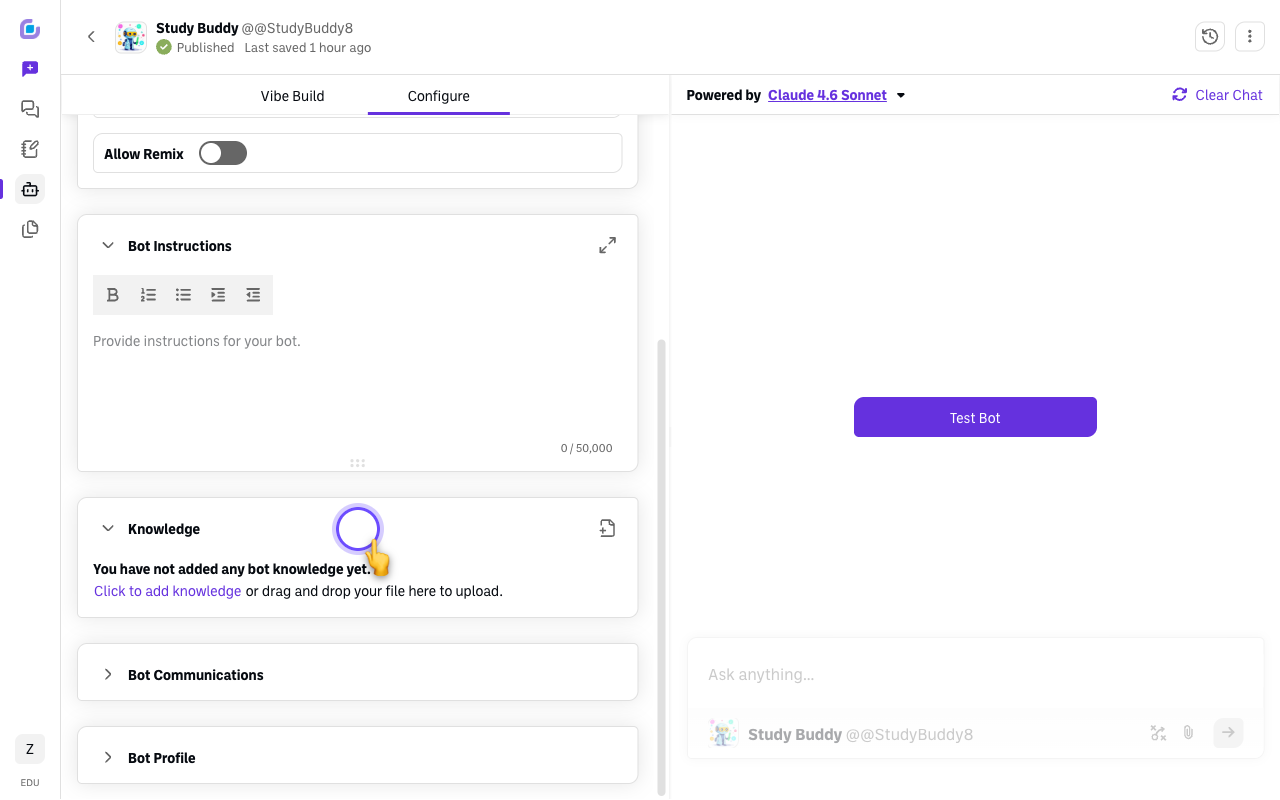
-
Mind the limits. A bot's Knowledge section holds up to 5 CSV/XLSX spreadsheets (plus other supported file types — see Supported file types and size limits).
-
Publish Changes. The bot can now reference those documents in its answers.
Bot Knowledge vs. the Knowledge Bank
These are different:
- A bot's Knowledge (here) makes that specific bot an expert on the files. The files stay with the bot.
- The Knowledge Bank is your platform-wide file library that you can attach to any chat or bot.
Verify it's working
- Open the bot in a chat and ask it about something only in the attached file — it should answer from the document.
Still stuck?
If the bot can't seem to read a file, see Bot cannot access uploaded documents. Email success@boodle.ai — typical response within 8 business hours.